HostelCare

Download the HostelCare Hostel Management App for Android and iOS

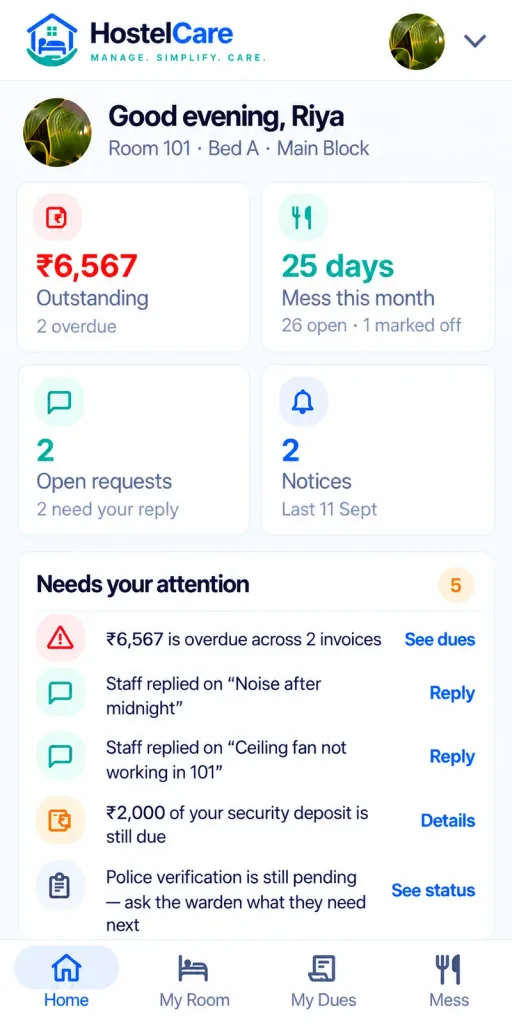
The HostelCare app puts your hostel in your pocket. Residents can pay fees, read notices and raise requests. Wardens and staff can check rooms, follow complaints and keep records up to date. The app is available for Android phones on Google Play and for iPhone on the App Store. Use the buttons below to start your hostel management app download, then sign in with the details your hostel gives you.

What is the HostelCare app?

HostelCare is hostel management software that runs on the web and on mobile. The app is the mobile side of the same system. It does not keep separate data. What you see on your phone is the same record the hostel office sees on its dashboard, so a payment, a notice or a complaint appears in both places.

Which phones can use the HostelCare app?

PhoneWhere to download
AndroidGoogle Play Store
iPhone (iOS)Apple App Store

Both versions work with the same HostelCare account, so a resident who changes from an Android phone to an iPhone only needs to sign in again.

What can you do with the HostelCare app?

What can residents do?

  • Pay hostel fees online and see receipts.
  • Check pending dues.
  • Read notices and announcements from the hostel.
  • Raise a request or report a problem and follow its status.
  • See room and hostel details.

Learn more on the student solution page.

What can wardens and staff do?

  • See room and bed status.
  • Follow open complaints and update them.
  • Send notices to residents or parents.
  • Check records without opening a laptop.

See the staff tools for the full picture.

What can owners and administrators do?

Owners and administrators can review occupancy, fee collection and complaints on the dashboard, with reports and analytics. The mobile app is most useful for daily work, while the dashboard is best for reviews and planning.

How do you download and set up the app?

If you do not have login details, ask your hostel office. Hostels create resident and staff accounts, so the app cannot be used before that is done.

  1. 1

    Open Google Play on Android or the App Store on iPhone and search for HostelCare, or use the buttons on this page.

  2. 2

    Install the app.

  3. 3

    Open it and sign in with the account details your hostel office gave you.

  4. 4

    Check your profile and room details.

  5. 5

    Turn on notifications so you do not miss notices or fee reminders.

Do you need to install anything to use the dashboard?

No. The HostelCare dashboard works in your web browser, so wardens and owners can use it on a laptop or desktop without installing software. The mobile app is an addition, not a requirement.

Why do hostels use a mobile app?

Without an app

  • Residents call the office to ask about dues
  • Notices are posted on a board or in a chat group
  • Complaints are given verbally
  • Wardens carry registers

With the HostelCare app

  • Residents check dues and pay on their phone
  • Notices reach residents directly
  • Requests are logged and tracked
  • Wardens use their phone

What should you do if you have trouble with the app?

  • Update the app to the latest version.
  • Check that your login details are correct. If they are not, ask your hostel office.
  • Make sure notifications are allowed in your phone settings.
  • Check your internet connection.
  • Visit the help center or contact us if the problem continues.

How is your data handled?

Your account is linked to your hostel, and what you can see depends on your role. Read our privacy policy to understand how personal details are handled.

If you want your account deleted, visit our account deletion page.

Are you a hostel owner or administrator?

If your hostel does not use HostelCare yet, the app is only one part of the system. HostelCare also covers room and bed management, fee collection, communication and reports. You can see all of it in a free demo, and a 15-minute demo is the quickest way to find out if it fits your hostel. You can also learn about the mobile app features first. mobile app features.

Book Free Demo

Frequently asked questions about the hostel management app download

Is the HostelCare app available for Android and iPhone?

Yes. You can download it from Google Play for Android and from the App Store for iPhone.

Can I use the same account on Android and iPhone?

Yes. Both apps use your HostelCare account. Sign in with the same details on either phone.

How do I download the HostelCare app?

Search for HostelCare on Google Play (Android) or the App Store (iPhone), or use the store buttons on this page, install the app and sign in with the details your hostel gave you.

Who can use the HostelCare app?

Residents, wardens and staff of hostels that use HostelCare. Your hostel office creates your account.

Do I need the app to use HostelCare?

No. The dashboard works in a web browser. The app adds convenience for daily tasks.

I installed the app but cannot sign in. What should I do?

Check the login details with your hostel office, update the app and try again. If the problem continues, contact HostelCare support.

Can I pay my hostel fees in the app?

Yes, if your hostel has turned on online fee payment. Receipts are generated automatically.

Does the app show hostel notices?

Yes. Notices sent by your hostel appear in the app. Turn on notifications to receive them quickly.

How do I delete my account?

Use the account deletion page on the HostelCare website.

My hostel does not use HostelCare. Can I still download the app?

You can install it, but you need an account created by a hostel that uses HostelCare. Hostel owners can book a demo to get started.


Get HostelCare for your hostel

Download the app if your hostel already uses HostelCare. If you run a hostel and want to see how it works for rooms, fees and complaints, book a free demo.